CPU Timing and Pipelining Explained
A CPU does not execute instructions continuously in a smooth flow. Instead, every operation inside the processor is synchronized using a clock signal. This clock acts like a heartbeat, coordinating when instructions are fetched, decoded, executed, and written back.
Modern processors perform billions of these synchronized operations every second.
What Is a Clock Cycle?
A clock cycle is a single pulse generated by the CPU clock. The processor uses these pulses to synchronize internal operations.
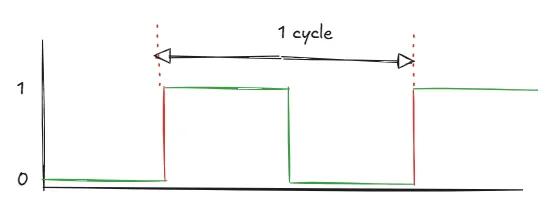
Each pulse marks a timing boundary where CPU components perform specific actions. Examples:
- fetch an instruction
- read registers
- perform ALU operations
- access memory
- write results back
Clock Speed and Frequency
Clock speed measures how many clock cycles occur every second. It is measured in Hertz (Hz).
Examples:
| Frequency | Meaning |
|---|---|
| 1 MHz | 1 million cycles/second |
| 1 GHz | 1 billion cycles/second |
| 3.5 GHz | 3.5 billion cycles/second |
A processor running at 3.5 GHz generates: 3.5×10^9 clock cycles per second.
However, higher clock speed alone does not guarantee better performance. CPU architecture and instruction efficiency also matter.
Instruction Cycle and Clock Cycles
The instruction cycle is divided into multiple stages, and each stage is tied to clock cycles. A simplified instruction pipeline looks like this:
| Stage | Purpose |
|---|---|
| Fetch | Get instruction from memory |
| Decode | Interpret instruction |
| Execute | Perform operation |
| Memory | Access memory if needed |
| Write Back | Store result |
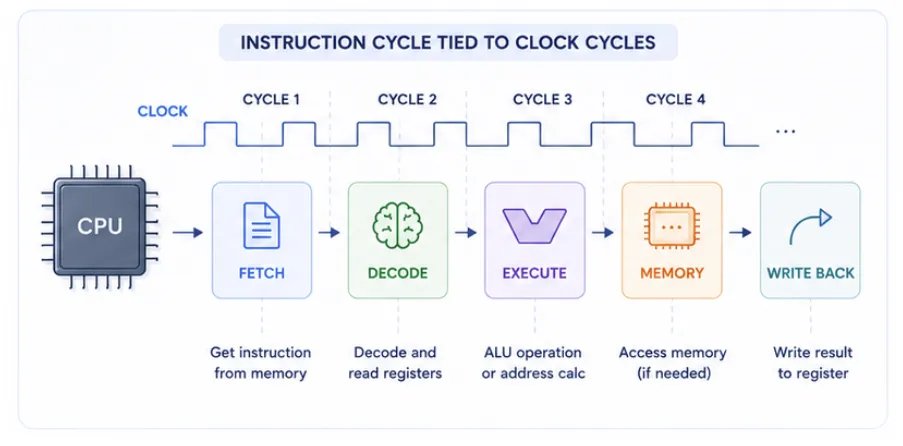
In an idealized simple pipeline, each stage is designed to complete in one clock cycle. In practice, however, some stages may take longer (for example, memory access or complex ALU operations), and the CPU may insert stalls or wait states to handle these delays.
Why Different Instructions Take Different Cycles ?
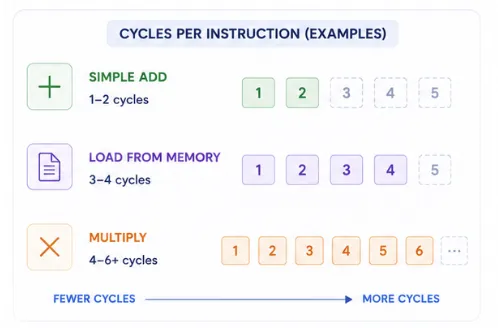
- Simple instruction (ADD R1, R2): Needs register read, ALU addition, and write-back → ~1–2 cycles.
- Complex instruction (LOAD R1, [200]): Requires address calculation, memory access, and data transfer → ~3–4 cycles.
CPU Throughput vs Instruction Latency
| Term | Meaning |
|---|---|
| Latency | Time taken for one instruction |
| Throughput | Number of instructions completed over time |
Modern CPUs improve performance mainly by increasing throughput. This is where pipelining becomes important.
What Is Pipelining?
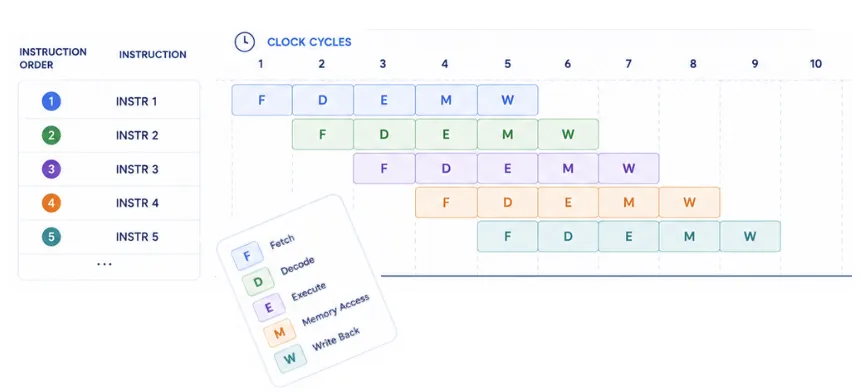
Pipelining is a technique where multiple instructions overlap during execution. Instead of waiting for one instruction to fully finish before starting the next, the CPU works on several instructions simultaneously in different stages.
Suppose each instruction requires 5 stages - Fetch → Decode → Execute → Memory → Write Back
Without Pipelining - Instruction 1 completes fully, then Instruction 2 starts so on.
With Pipelining - While Instruction 1 is in Fetch state, Instruction 2 might start as well and so on.
Common confusion regarding pipelining
Pipelining works because a CPU has separate hardware units for each stage—fetch, decode, execute, etc.—so while one instruction is being executed, the next can be decoded and another fetched at the same time. Even on a single core, these units operate in parallel, overlapping work like an assembly line to boost throughput without needing multiple cores.
Conclusion
Every CPU operation is synchronized by clock cycles. While latency defines how long one instruction takes, pipelining ensures that modern processors achieve high throughput by overlapping stages. Together, clock cycles and pipelining form the backbone of efficient CPU performance.